


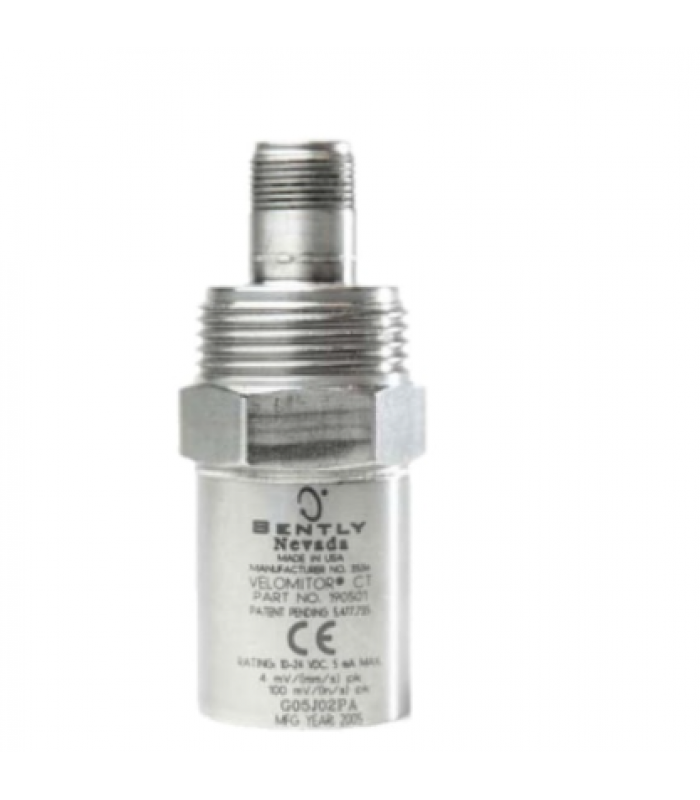
BENTLY NEVADA 190501-12-00-04 Velomitor CT Velocity Transducer
- Product Code: 190501-12-00-04
- Availability: In Stock
Velomitor CT Velocity Transducer
Technical Documentation
1. Overview
The BENTLY NEVADA 190501-12-00-04 Velomitor CT is a high-performance velocity transducer designed for monitoring vibration in industrial machinery. It is specifically engineered for low-frequency applications such as cooling towers and air-cooled heat exchanger fan assemblies operating at or above 90 RPM.
This transducer combines a rugged stainless steel housing with advanced sensing technology to provide accurate and reliable velocity measurements in harsh industrial environments. The Velomitor CT is part of Bently Nevada's comprehensive machinery protection and condition monitoring product line.
2. Specifications
| Parameter | Value |
|---|---|
| Model Number | 190501-12-00-04 |
| Sensor Type | Velocity Transducer |
| Sensitivity | 100 mV/in/s ± 5% (3.94 mV/mm/s ± 5%) |
| Frequency Range | 10 Hz to 2000 Hz (± 3 dB) |
| Output Signal | ± 10 V DC or 4-20 mA |
| Operating Temperature | -40°C to +85°C |
| Storage Temperature | -40°C to +85°C |
| Power Supply | 12 VDC ± 5% |
| Power Consumption | ≤ 30 mA |
| Parameter | Value |
|---|---|
| Accuracy | ± 0.2% of full scale |
| Measurement Range | 0 to 2000 RPM |
| Housing Material | Stainless Steel |
| Protection Rating | IP67 |
| Mounting | Plate stud 3/8-in 24 to M8x1 (Option 12) |
| Connection | MIL-C-5015 interface |
| Weight | 0.297 kg (10.5 oz) |
| Dimensions | 7 × 6 × 3 cm |
| Certifications | CSA/NRTL/C (Class I, Div 1), ATEX/IECEx/CSA (Zone 0/1) |
3. System Architecture
The BENTLY NEVADA 190501-12-00-04 Velomitor CT velocity transducer utilizes a piezoelectric sensing element to measure vibration velocity. The transducer consists of a seismic mass attached to a spring, which moves relative to the transducer housing when vibration occurs.
This movement generates an electrical charge proportional to the vibration velocity, which is then converted to a voltage signal. The signal is conditioned and amplified within the transducer before being transmitted to a monitoring system for analysis and display.
The Velomitor CT is designed to provide a direct velocity output, eliminating the need for additional signal processing equipment. This makes it an ideal solution for integration with various monitoring systems and control panels.
4. Installation Guide
4.1 Safety Precautions
- Ensure the equipment is de-energized before beginning installation.
- Follow all lockout/tagout procedures to prevent accidental startup.
- Wear appropriate personal protective equipment (PPE) including safety glasses and gloves.
- Verify that the installation surface can support the weight of the transducer.
- Ensure proper ventilation and lighting in the installation area.
4.2 Installation Procedure
- Select an appropriate mounting location on the equipment casing where vibration measurement is required.
- Prepare the mounting surface by cleaning it of any debris, paint, or corrosion.
- Install the mounting plate using appropriate hardware for the equipment material.
- Attach the transducer to the mounting plate using the provided stud (3/8-in 24 to M8x1).
- Torque the transducer to 40 in-lb using a torque wrench.
- Connect the signal cable to the MIL-C-5015 interface on the transducer.
- Route the cable to the monitoring system, ensuring proper cable management to avoid damage.
- Connect the cable to the monitoring system according to the wiring diagram.
- Apply power to the system and verify proper operation.
Installation Tips
- Orientation: The transducer can be installed in any orientation.
- Cable Length: Maximum recommended cable length is 305 meters (1000 ft).
- Environmental Protection: Ensure proper sealing to maintain IP67 rating.
- Vibration Isolation: Avoid mounting near high-vibration components.
5. Wiring Diagram
5.1 Terminal Connections
| Terminal | Description | Wire Color |
|---|---|---|
| VCD | Power Supply (12 VDC) | Blue |
| SIG | Signal Output | Red |
| GND | Ground | Green |
| RCC | Remote Calibration Control | Black |
5.2 Wiring Notes
- Use shielded twisted pair cable for signal wiring to minimize noise interference.
- Ground the cable shield at one end only (preferably at the monitoring system).
- Ensure proper wire gauge for the distance to maintain signal integrity.
- Separate signal wires from power cables to avoid electromagnetic interference.
- Use appropriate cable glands to maintain the IP67 environmental rating.
6. Configuration Instructions
6.1 Initial Setup
- Apply power to the transducer (12 VDC ± 5%).
- Allow the transducer to stabilize for at least 15 minutes before calibration.
- Connect a calibrated signal generator to the monitoring system.
- Set the signal generator to produce a 100 Hz sine wave at 1 in/s (25.4 mm/s) velocity.
- Adjust the monitoring system to display the correct velocity reading.
- Verify the output signal is within the specified range (± 10 V DC or 4-20 mA).
6.2 Parameter Configuration
| Parameter | Configuration Method | Default Value |
|---|---|---|
| Sensitivity | Factory calibrated, non-adjustable | 100 mV/in/s |
| Frequency Range | Factory set, non-adjustable | 10 Hz to 2000 Hz |
| Output Type | Configurable via monitoring system | Voltage (± 10 V DC) |
| Filter Settings | Configurable via monitoring system | None |
6.3 Calibration Procedure
The BENTLY NEVADA 190501-12-00-04 Velomitor CT velocity transducer is factory calibrated and does not require field calibration under normal operating conditions. However, periodic verification is recommended to ensure accurate measurements.
Calibration Verification
- Use a calibrated vibration shaker to apply a known vibration velocity to the transducer.
- Measure the output signal using a calibrated oscilloscope or multimeter.
- Compare the measured output with the expected output based on the applied velocity.
- If the deviation exceeds ±5%, return the transducer to an authorized service center for recalibration.
6.4 Monitoring System Integration
The Velomitor CT transducer is compatible with most industrial monitoring systems. Follow these steps for integration:
- Consult the monitoring system documentation for specific integration requirements.
- Configure the monitoring system to accept the transducer's output signal (± 10 V DC or 4-20 mA).
- Set appropriate alarm thresholds based on the application requirements.
- Implement data acquisition and analysis algorithms suitable for velocity measurements.
- Verify communication between the transducer and monitoring system.
7. Troubleshooting
7.1 Common Issues and Solutions
| Symptom | Possible Cause | Solution |
|---|---|---|
| No output signal | Power supply failure | Check power connections and supply voltage |
| No output signal | Broken or disconnected cable | Inspect and repair/replace cable |
| No output signal | Transducer failure | Replace transducer |
| Erratic output | Loose connections | Check and tighten all connections |
| Erratic output | Electromagnetic interference | Relocate cables away from power sources |
| Low output signal | Incorrect sensitivity setting | Adjust monitoring system settings |
| Low output signal | Transducer aging | Recalibrate or replace transducer |
7.2 Diagnostic Tests
Resistance Measurement
- Disconnect the transducer from the monitoring system.
- Measure the resistance between the signal (SIG) and ground (GND) terminals.
- A reading of 7.5 Ω to 9.5 Ω indicates a healthy transducer.
- A reading of 0 Ω indicates a short circuit.
- A reading of infinity indicates an open circuit.
Insulation Resistance Test
- Disconnect the transducer from the monitoring system.
- Use a megohmmeter to measure the insulation resistance between the signal terminals and the transducer housing.
- A reading of > 100 MΩ indicates good insulation.
- A reading of < 1 MΩ indicates insulation failure.
7.3 Fault Codes
| Fault Code | Description | Action |
|---|---|---|
| E01 | Power supply error | Check power connections and supply voltage |
| E02 | Signal out of range | Verify measurement range and application |
| E03 | Internal temperature error | Check operating environment temperature |
8. Interactive System Diagram
Component Information
Click on any component in the diagram to view detailed information about it.
9. Maintenance
9.1 Regular Maintenance Schedule
| Maintenance Task | Frequency | Procedure |
|---|---|---|
| Visual Inspection | Monthly | Check for physical damage, corrosion, or loose connections |
| Signal Verification | Quarterly | Verify output signal is within specified range |
| Calibration Verification | Annually | Verify calibration using calibrated test equipment |
| Cable Inspection | Semi-annually | Inspect cables for damage, wear, or老化 |
| Complete Recalibration | Every 2 years | Return to authorized service center for complete recalibration |
9.2 Cleaning Procedures
Proper cleaning of the BENTLY NEVADA 190501-12-00-04 Velomitor CT velocity transducer is essential for maintaining accurate measurements and extending the service life of the device.
External Cleaning
- Disconnect power to the transducer before cleaning.
- Use a soft, dry cloth to remove dust and debris from the transducer housing.
- For more stubborn dirt, use a cloth dampened with mild detergent and water.
- Avoid using harsh chemicals, solvents, or abrasive materials.
- Ensure the transducer is completely dry before restoring power.
9.3 Replacement Guidelines
Consider replacing the transducer in the following situations:
- When calibration verification shows a deviation of more than ±5% from the specified values.
- When the transducer has been in service for more than 5 years.
- When physical damage is visible or suspected.
- When the transducer fails diagnostic tests.
- When the transducer has been exposed to extreme conditions beyond its specifications.
10. Applications
The BENTLY NEVADA 190501-12-00-04 Velomitor CT velocity transducer is designed for a wide range of industrial applications where accurate vibration monitoring is critical. Its rugged construction and reliable performance make it suitable for harsh environments.
10.1 Key Applications
- Cooling Towers: Monitoring fan assembly vibration in cooling tower systems.
- Air-Cooled Heat Exchangers: Measuring vibration on fan assemblies.
- Pumps: Monitoring bearing and motor vibration in pump systems.
- Motors: Vibration monitoring on electric motors.
- Gearboxes: Detecting abnormal vibration patterns in gear transmission systems.
- Compressors: Monitoring vibration in reciprocating and centrifugal compressors.
10.2 Industry Applications
Power Generation
Turbines, generators, cooling systems
Oil & Gas
Pumps, compressors, pipeline systems
Chemical Processing
Mixers, agitators, processing equipment
Water Treatment
Pumps, blowers, filtration systems
10.3 Application Notes
- The Velomitor CT is specifically designed for low-frequency applications (90 RPM and above).
- For best results, mount the transducer on a rigid surface perpendicular to the direction of vibration.
- Ensure the mounting surface is clean and free of paint or corrosion.
- Avoid mounting near sources of electromagnetic interference.
- For critical applications, consider redundant transducer installation for increased reliability.